


Youmeal: Recipe Keeper
4.717.00 Reviews
App Specs
- Version
- 1.0.13
- Updated On
- License
- Free
- Downloads
- 100,000+
- Developer
- Saclic Studio
- Categories
- Food & Drink
- Platform
- Android
Screenshots
 Analysis by AppCompare
The easiest way to judge a recipe organizer is to try it with one dish you already cook, not to spend an evening building a perfect digital cookbook. I’d start with a family recipe or a reliable weeknight favorite and see whether keeping it in one place makes the next meal simpler. Youmeal: Recipe Keeper is designed for that sort of everyday use: it brings recipes, meal planning and shopping into one cooking-focused app rather than leaving them split between browser tabs, notes and screenshots.
It is a free Food & Drink app from Saclic Studio, with optional in-app purchases listed at $9.99 to $39.99 per item. The app is rated for Everyone, and its 4.7 average across around 11,000 ratings suggests many users find it worthwhile. I’d still treat the rating as a broad signal, not a promise that every workflow will suit you. The more useful question is whether you want a dedicated home for recipes and are willing to enter or organize them as you go.
What to expect from a recipe-first app
Youmeal is best approached as a personal kitchen reference, not as a place to discover a social feed of trending dishes. Its appeal is practical: keep recipes together, plan meals, and turn ingredients into a shopping list. That combination makes sense if you often repeat meals or save recipes from different places and later struggle to find the one you meant to cook.
The app has reached over 100,000 installs, and its current version is 1.0.6. It was released on December 10, 2025, and supports Android 7.0 and later. Those details make it accessible to a range of Android devices, though I’d check that your phone’s software meets the minimum before planning to use it. The core idea is easy to understand, but the value grows only as you add recipes you genuinely expect to use.
Start small instead of importing your whole kitchen
For a first setup, I’d add just a few dependable meals: perhaps a quick dinner, a dish you make for guests, and one recipe you want to try soon. This gives you something useful to browse without turning setup into a chore. When a recipe is already online, the import option described in the app’s workflow can spare you from retyping it; for handwritten or family instructions, manual entry gives you a way to preserve the details that matter.
When adding a recipe by hand, take a moment to make the ingredient list and steps clear enough to follow while cooking. A short note such as “add the herbs near the end” can be more helpful than a polished photo if that is the detail you usually forget. Tagging recipes as you add them can also pay off later: choose labels you’ll remember and use, rather than creating a long taxonomy before you know how you search.
Your first useful result: cook one saved recipe
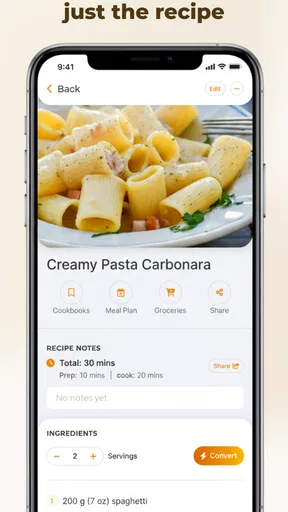
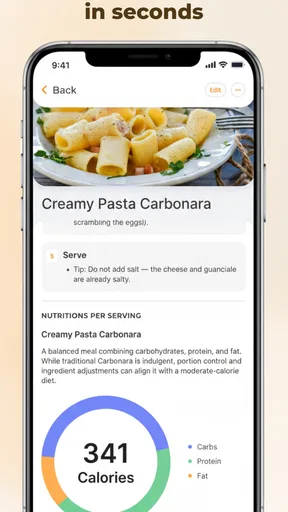
Once you have a recipe in the app, use it for an actual meal before adding more. Open it while preparing dinner, check that the ingredients and directions make sense on screen, and adjust the serving size if you need to. That first test is a good way to catch missing quantities or steps while the recipe is still easy to correct. It also shows whether a digital copy is genuinely more convenient for you than the source you used before.
Worth Reading Before You Choose

Flipboard Shows What News Apps Must Do Beyond the Feed

Switching to Android Auto Means Rethinking Your Driving Routine

Google Calendar Makes a Crowded Week Easier to Manage

Ludo King Makes the Most of the Minutes Between Plans

Baby Panda World Brings Quick Play to Modern Phones, but Its Game Library Feels Busy

ESPN’s Live Game View Makes Following Close Games Easier
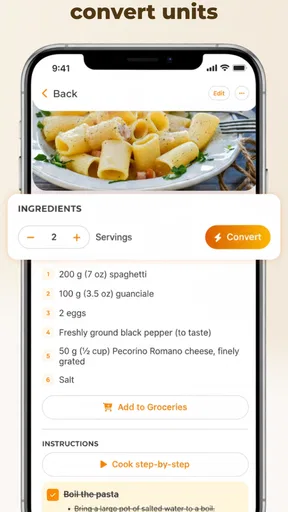
Serving-size adjustment can be especially handy when a recipe written for a larger group needs to work for two, or when you want to make extra portions. I’d still use judgement with ingredients that don’t scale neatly, such as seasonings: automatic quantity changes are a useful starting point, but taste and cooking conditions can call for a small adjustment.
Planning and shopping without overcomplicating it
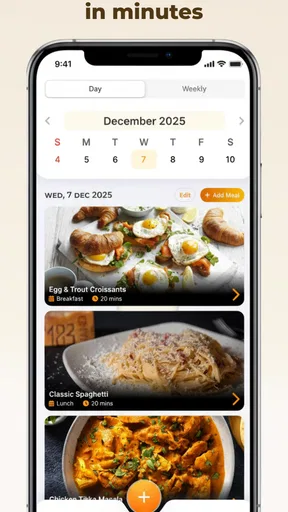
The planner is most useful when you begin with meals you already know you can make. Put a few of them into the week, then use the generated shopping list to see what you need. This is a more reliable first run than trying to plan every meal at once, especially if your schedule changes. You can build a routine around the meals you actually cook rather than treating the planner as a commitment to follow a rigid menu.
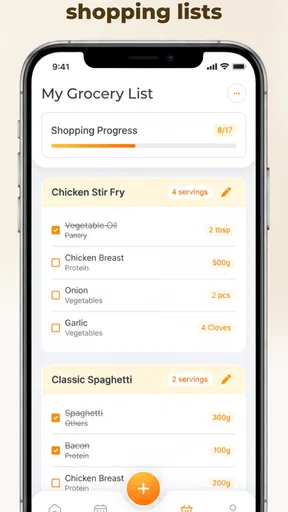
The aisle-based organization of the shopping list can make a grocery trip easier to scan, but it does not remove the need to check what is already in your cupboards. I’d review the list before leaving home, remove anything you have, and watch for ingredients that appear in more than one planned recipe. That quick check helps prevent duplicate buying and keeps the list useful rather than simply longer.
Sharing, printing and keeping family recipes usable
For recipes that get requested by friends or relatives, sharing through email or social media is a convenient alternative to copying instructions into a message. Printing can be useful too, particularly if you prefer a paper recipe beside the counter or want to cook without handling your phone. Those options make the app more than a private archive, though you may still want to review a recipe before sending it so the version you share has the right quantities and notes.
Family recipes often have vague instructions that make perfect sense to the person who has cooked them for years. When you enter one, I’d turn those assumptions into steps: note how finely something is chopped, describe what the mixture should look like, or record when a familiar ingredient goes in. The app can keep the recipe in one place, but the quality of the saved version depends on the detail you preserve.
Where it differs from notes, bookmarks and recipe sites
A notes app is flexible and may be enough if you save only a handful of dishes. Browser bookmarks are quick when you want to return to a web page, but they leave recipes scattered across sites and do not, by themselves, connect a meal plan to a shopping list. Youmeal’s stronger case is the move from saved recipe to planned meal to ingredients to buy. If that sequence matches your habits, a dedicated organizer can feel more useful than a folder of links.
There is a trade-off: a recipe organizer needs some upkeep. A bookmark can be saved in seconds, while a personal collection becomes valuable through sensible tags, complete instructions and occasional cleanup. If you rarely cook at home, prefer discovering recipes through a large community, or need specialized dietary filtering to make safe choices, a different service built around those priorities may suit you better. The app’s tagging helps with organization, but tags are not the same as built-in dietary guidance.
Small habits that make the collection more useful
One practical trick is to use a consistent naming style. If you have several versions of a dish, names such as “lentil soup — quick” and “lentil soup — weekend” make the distinction visible when you are hungry and in a hurry. Another is to add a recipe only after deciding what you want to retain from it: the complete instructions, a family variation, or simply a dependable ingredient list. That decision keeps the collection from becoming a second pile of uncategorized screenshots.
I’d also treat the planner as a flexible shortlist, not a promise that every planned meal will happen. If one evening gets busy, move to a simpler saved recipe and adjust the shopping list before you shop. This small change turns planning into a way to reduce last-minute decisions instead of another task to feel guilty about. The app is more helpful when it reflects real routines, including leftovers, repeated favorites and the occasional change of plan.
Who will appreciate it, and where it may frustrate
Youmeal makes the most sense for home cooks who already collect recipes and want to connect that collection to the week’s meals. It can also help someone who is learning to cook: having ingredients and steps together, with serving adjustments available, gives a beginner a clearer reference than a string of open tabs. For a household that shares favorite dishes, the ability to send or print a recipe offers a straightforward way to pass it along.
It is less compelling if your main goal is browsing a lively community, finding recipes tailored to strict dietary needs, or avoiding any time spent organizing. The app’s usefulness depends on the recipes you bring into it, and manually adding older family dishes can take patience. Optional purchases are another consideration: the app is free to try, but purchases are available, so I’d look at the in-app options before deciding whether any paid item is worth it for your own routine.
Common points of uncertainty before settling in
A first-time user may wonder whether to start with an imported recipe or a manual one. I’d choose whichever removes the most friction: import a web recipe you plan to cook soon, but type in a family favorite if preserving your own version matters more than speed. Either way, make one recipe complete and test it before investing effort in a large collection.
You may also wonder whether the app can replace your usual shopping process. I’d use its generated list as a working draft and still check pantry staples, quantities and duplicate ingredients. And if you cook for a particular diet, do not assume that a tag alone validates a recipe; read the ingredients and instructions carefully. These are sensible checks for any personal recipe organizer, and they help keep its convenience grounded in the way you actually shop and cook.
If you are deciding whether to keep using it after the first day, try a small weekly routine: save one recipe, schedule it, check the resulting shopping list, then cook from the saved instructions. That single loop tells you more than filling the app with recipes you may never make. If it reduces the time you spend searching and helps you remember what to buy, it is earning its place; if it feels like extra administration, a simple notes folder may be all you need.
The Ultimate Kitchen Companion
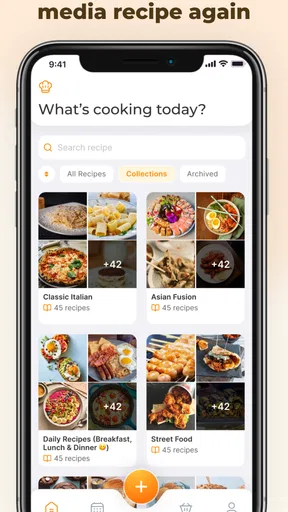
At first glance, Youmeal: Recipe Keeper feels like that trusty kitchen companion we all need but never had. The app’s interface is sleek and user-friendly, making it super easy to navigate. Once you open it, you’re greeted with a clean dashboard that offers a variety of features to explore.
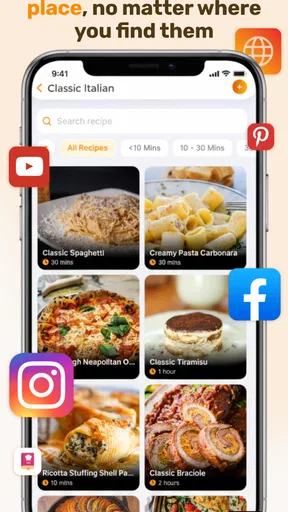
All Your Recipes in One Place
One of the standout features is the ability to import recipes from websites. Gone are the days of manually typing everything out! Just grab the URL, pop it into the app, and voilà, your recipe is saved. This feature alone makes meal planning so much easier.
But it doesn’t stop there. You can also manually add your family’s secret recipes. The app allows you to input ingredients, steps, and even upload photos so you can capture grandma’s stew in all its glory. Everything is stored neatly, and you can tag recipes for quick access later.
Meal Planning Made Easy
Meal planning has always been a bit of a chore for me. But with the app’s built-in planner, I found myself actually looking forward to it. You can schedule meals for the week and even generate a shopping list based on the ingredients you need. Talk about a time saver!
The shopping list feature is quite intuitive. It categorizes items by grocery aisles, so no more zig-zagging through the store trying to find that one last item. It’s all about efficiency here.
Sharing is Caring
Once you’ve got your recipes all set, sharing them is a breeze. The app allows you to share your culinary creations with friends and family via email or social media. This is perfect for those times when someone asks for the recipe of that amazing dish you served at the last potluck.
I also appreciate the option to print recipes directly from the app. Sometimes, there’s nothing like having a physical copy in hand while you cook.
Customization at Its Best
Another feature I found particularly useful is the customization options. You can adjust serving sizes, and the app automatically recalculates ingredient quantities for you. This is a lifesaver when you’re cooking for a crowd or just for two.
Plus, the app supports multiple languages, which is a thoughtful touch for those who enjoy international recipes.
Room for Improvement
While Youmeal: Recipe Keeper is pretty fantastic, there are a couple of things I’d love to see in future updates. For instance, more options for dietary preferences would be great. Although you can tag recipes, having built-in filters for vegan, gluten-free, or keto diets would make the app even more versatile.
Also, a community feature where users can share and discover new recipes within the app would take it to the next level.
Despite these small suggestions, the app is an invaluable tool for anyone looking to streamline their cooking process.
Final Thoughts
In a nutshell, Youmeal: Recipe Keeper is a game-changer for home cooks and professional chefs alike. It’s easy to use, packed with useful features, and genuinely makes managing recipes a whole lot more enjoyable. If you’re tired of recipe chaos and want a little more order in your culinary life, give this app a try.
Whether you’re planning meals for the week or just trying to keep track of your favorite dishes, this app has got you covered. So, go ahead, download it, and start cooking up a storm!
Pros
- User-friendly interface
- easy navigation.
- Syncs recipes across multiple devices.
- Customizable categories for easy sorting.
- Includes a meal planner feature.
- Offline access to saved recipes.
Cons
- Limited import options from other apps.
- No nutritional information for recipes.
- Ads can be intrusive in free version.
- No integration with grocery delivery services.
- Requires sign-up for full features.
FAQs for Youmeal: Recipe Keeper
What is Youmeal: Recipe Keeper and how does it work?
Youmeal: Recipe Keeper is an intuitive app designed to help users organize and store their favorite recipes in one convenient location. With features like ingredient sorting, meal planning, and grocery list generation, it streamlines the cooking experience. Users can import recipes from the web or manually input their own, making it a versatile tool for both amateur cooks and culinary enthusiasts.
Can I use Youmeal: Recipe Keeper offline?
Yes, Youmeal: Recipe Keeper supports offline access, allowing users to view and manage their saved recipes without an internet connection. This feature is particularly useful for those who cook in locations with limited connectivity. However, certain features, like web import and sharing options, may require a network connection.
Is Youmeal: Recipe Keeper available on both Android and iOS?
Youmeal: Recipe Keeper is available for both Android and iOS platforms, ensuring a seamless experience across different devices. Users can download the app from the Google Play Store and Apple App Store, making it accessible to a wide audience. Cross-platform compatibility might also be supported, allowing users to sync data between devices.
Does the app offer any meal planning or grocery shopping features?
Absolutely! Youmeal: Recipe Keeper includes robust meal planning and grocery shopping features. Users can plan meals for the week, generate shopping lists based on selected recipes, and even categorize items by grocery aisle. These functionalities aim to simplify the cooking process and help users stay organized.
Are there any costs associated with using Youmeal: Recipe Keeper?
Youmeal: Recipe Keeper offers a free version with basic features, but users can opt for a premium subscription to unlock additional functionalities, such as cloud backup, advanced meal planning options, and ad-free usage. Pricing details vary, so users should check the app store for the latest subscription offers and packages.


